Pro can translate new and changed pages for you, without you starting a run. It needs a translation service (DeepL, Google or an AI service) with its key, and an active licence. Free never translates by itself: you start Free Translate in Chrome when you choose.
Turn it on
- Add the key for your first translation service.
- Lango7 asks how you want to translate: Only when I choose (recommended) or Automatically. Nothing is sent to a paid service until you pick.
- Pick Automatically. You can change it later in Translate → Settings → Automation.
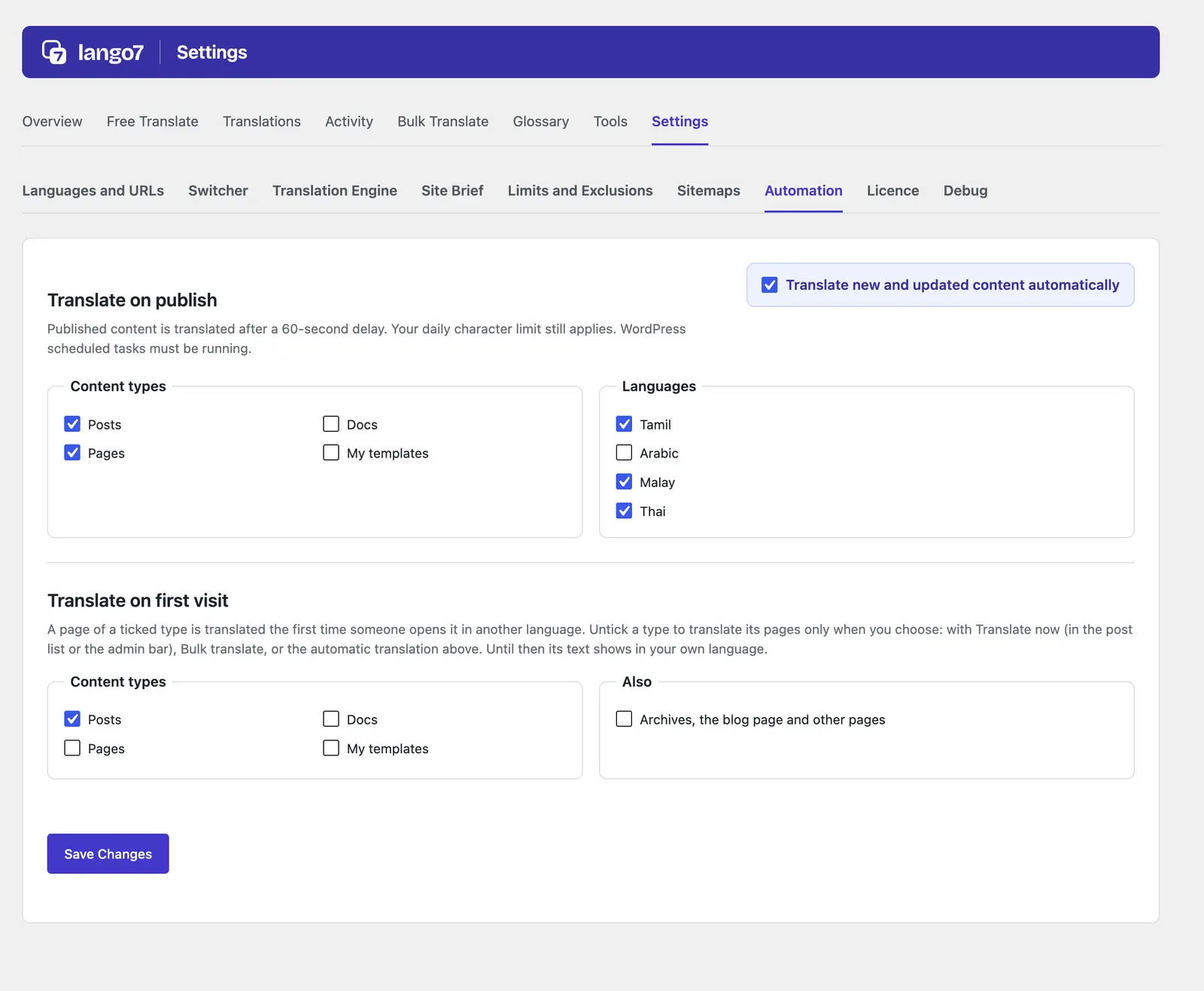
Two ways it starts
Automatic translation has two triggers. Turn each one on or off on its own.
When you publish or update
- Publishing or updating a page, or changing its builder or SEO settings, adds it to a queue.
- About a minute later, Lango7 opens the page as a visitor would and sends only the sentences that have no translation yet, for each language.
- Sentences that are already translated are reused and cost nothing.
- If more than 20 pages change at once, for example after an import, they run as one batch.
- You choose which post types it applies to.
When a page is skipped or waits
- Drafts, private and password-protected pages are skipped.
- Pages on the Don’t translate list are skipped.
- If Bulk translate is running, the page waits until it finishes.
- If another translation job is running, Lango7 tries again a little later.
When someone first visits a page
- If a translated page has sentences with no translation yet, Lango7 translates as many as it can while the page loads, and queues the rest.
- Until they’re ready, those sentences show in your own language. On the next visit, they’re translated.
- You choose which post types it applies to, and whether archives, the homepage and similar pages count.
Limits, errors and your edits
- Daily limit: when a service reaches your daily character limit, automatic translation stops until the next day. You get one email that day, and waiting pages show Waiting (daily limit reached).
- Errors: if one sentence or title can’t be translated, it stays in your own language and the rest of the page is translated. It is listed in Activity with a Review link. Only an outage, such as the service being down or out of credit, stops the job; a page that fails is tried again up to 3 times, 5 minutes apart.
- Your edits: automatic runs never overwrite a translation you’ve edited by hand.
- Licence: without an active licence, both triggers turn off. Translations you already have keep showing.
If you’d rather choose
With Only when I choose, nothing is translated until you start it:
- Translate now, in the Languages column, the admin bar or the front-end editor.
- Bulk translate, which shows the cost before anything is sent.