I tested Lango7 on an Elementor multilingual site, taking it from English to Malay with Claude Haiku. Everything I checked worked, and the site looked as fast as it did without Lango7. I also had the server response timed, so you can see numbers as well as my impression.
In short
- Claude Haiku 5.5 translated my three Elementor pages, about 18,500 characters, in less than a minute.
- In my local test, Lango7 added about 4 to 7 ms to server response time.
- I didn’t have to copy any pages. Lango7 translates the page after WordPress and Elementor have built it.
- Malay needs Lango7 Pro, because Chrome’s built-in translator doesn’t offer it.
How I tested Lango7 with Elementor
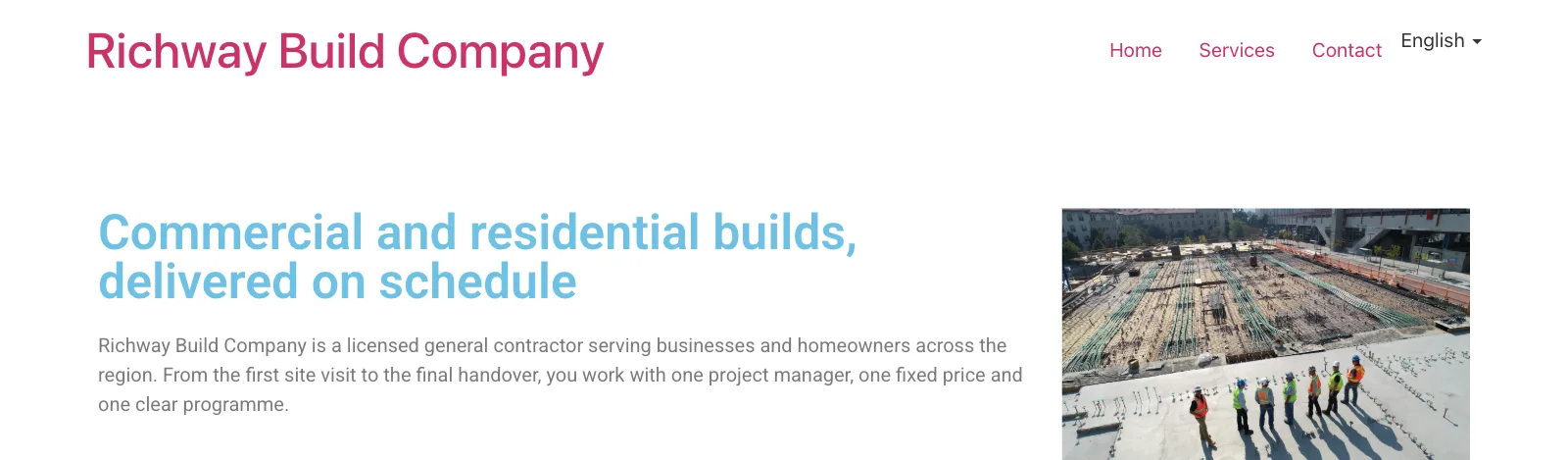
The test site ran on my own computer with a made-up building company, Richway Build Company. I built the Home, Services and Contact pages in Elementor.
| Part | What I used |
|---|---|
| WordPress | 7.1.5 |
| PHP | 8.2.29 |
| Theme | Hello Elementor |
| Elementor | 4.4.2 (Elementor Pro was not active) |
| Lango7 and Lango7 Pro | 1.23 |
| Languages | English to Malay |
| Translation service | Anthropic Claude, model Claude Haiku 5.5 |
I ran a bulk translation. For Home, Services and Contact, Lango7’s activity log shows 166 pieces of text and 18,479 characters. The third page finished about 42 seconds after the run started.
The full run also covered the Sample Page and Hello World, which I didn’t build in Elementor. All five pages came to 189 sentences and 19,967 characters, and took about 84 seconds. Your times will depend on your server, your connection and how busy the translation service is.
How Lango7 translates Elementor pages
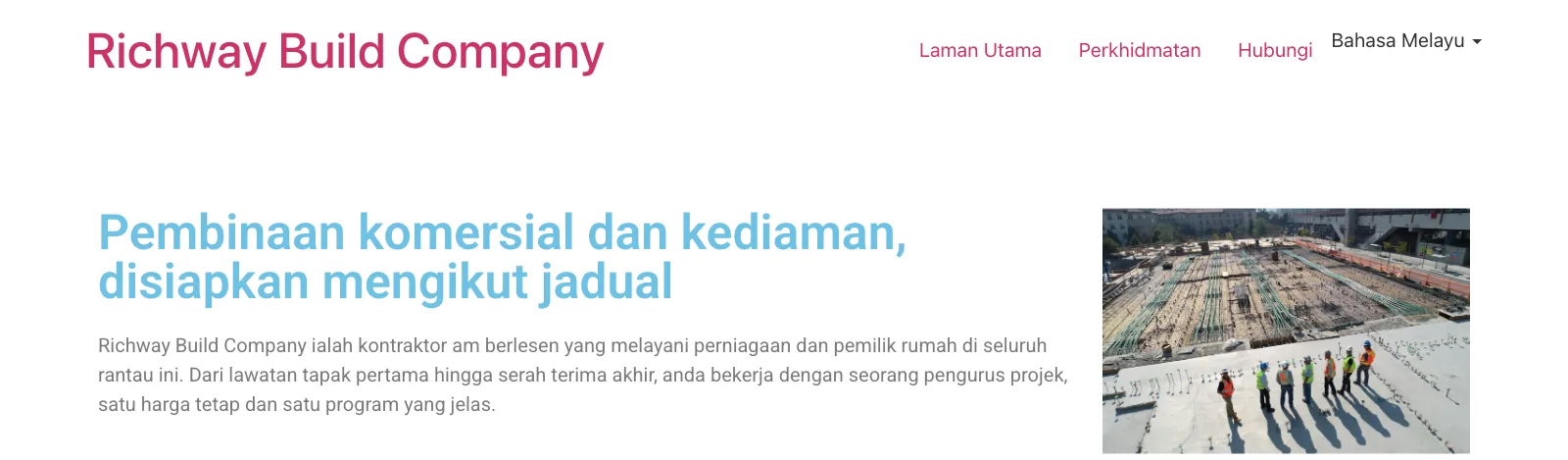
Lango7 works on the finished page. WordPress and Elementor build it as usual, then Lango7 translates the text, saves each translated sentence in your database and serves it from there. The Malay version gets its own address under /ms/.
You keep one Elementor design, so a layout change doesn’t have to be repeated in a second copy of the page. Lango7 also leaves the Elementor editor preview untranslated, which means you keep editing in your original language. I wrote more about this approach in translating WordPress without duplicate posts.
How to make your Elementor site multilingual
- Install Lango7 Free and, for Malay or automatic translation, Lango7 Pro.
- Go to Translate → Settings → Languages and URLs, click Add a language and choose yours. The guide to adding a language covers the web address.
- With Pro, connect a translation service. For Claude, follow the steps to get an Anthropic API key. A Claude.ai subscription does not include API use.
- Open Translate → Bulk translate and pick your pages. It shows the character count and price before anything is sent.
- Add a language switcher so visitors can change language.
Pro can also translate new and changed pages automatically. That sends text to your paid service without you starting a run, so set a daily character limit first.
With Free, you translate in desktop Chrome instead. See how to translate your first page.
Did translation slow the site down?
Not in a way I could see. To check that, each page was requested 30 times in random order in three versions: without Lango7, in English with Lango7, and in Malay with Lango7. For the first version, a temporary test file switched off both Lango7 plugins for those requests only.
| Page | Without Lango7 | English with Lango7 | Malay with Lango7 |
|---|---|---|---|
| Home | 57 ms | 61 ms | 64 ms |
| Services | 52 ms | 56 ms | 59 ms |
| Contact | 52 ms | 56 ms | 58 ms |
In my local test, Lango7 added about 4 to 7 ms to server response time. The compressed HTML grew by less than 1 KB. Lango7 also loads a stylesheet and a script for the language switcher.
These timings are for pages that were already translated, on my computer, with WP_CACHE off. They don’t measure the first translation of a page, how long the browser takes to draw it, images and scripts, or a live server. Test your own site before you assume the same numbers.
Check your translated Elementor pages before going live
Open each translated page and go through this list:
- Menus, headings and buttons are translated, and links stay in the same language.
- Longer text still fits. Check buttons and headings on a phone too.
- Forms, including their labels and the messages shown after sending.
- Prices, brand names and place names are correct. You can keep brand names untranslated.
- Images with words in them. Free shows the same image in every language, while Pro lets you choose one per language.
To fix a sentence, use Translate → Edit translations in the admin bar, then click the text on the page. If you want to check everything before visitors see it, approve translations first. Ask someone who reads the language to review important pages.
What this test didn’t cover, and Lango7’s limits
This was a small site with three Elementor pages and one language. I did not test Elementor Pro features such as Theme Builder, popups or its forms. WooCommerce, a page cache and a live host were also outside this test.
Lango7 has limits too. Free needs desktop Chrome, and you start each translation yourself. It covers only the languages Chrome can translate, and Malay isn’t one of them. Free keeps your original page slugs, and a search on a translated page looks only through the original text. With a paid service, you pay that service for what it translates, and machine translation can still get wording wrong.
Free or Pro for an Elementor site?
Start with Free if Chrome supports your language and you’re happy to start each translation yourself. Choose Pro if you need Malay or another language Chrome lacks, a service such as Claude or DeepL, automatic translation, translated slugs or search in the visitor’s language.
On 27 November 2026, Pro was listed at $49 a year or $199 once for one website, with a 30-day refund. The translation service bills you separately. Until 6 December 2026, you can get 50% off with the Cyber Monday code. If you’re still comparing, read my look at the best multilingual plugin for WordPress.
Elementor multilingual FAQ
How long does it take to translate Elementor pages?
In my test, Claude Haiku 5.5 translated three pages, about 18,500 characters, in less than a minute. Your time will depend on your setup and the translation service.
Do I need to duplicate my Elementor pages?
Not with Lango7. It translates the rendered page and keeps the translations in your database, so you maintain one design.
Do I need Elementor Pro to use Lango7?
My test pages worked without Elementor Pro being active. I haven’t tested Elementor Pro features.
Can I translate an Elementor site for free?
Yes, with Lango7 Free in desktop Chrome, if Chrome’s translator supports your language. For Malay you need Lango7 Pro.
Will Lango7 slow down my Elementor site?
In my local test it added about 4 to 7 ms to server response time on translated or original pages. A live site may differ.
Try it on your Elementor site
Add a language, translate one page and check it before you do the rest.