There is no single best multilingual plugin for WordPress. The right one depends on how you want translations stored, who edits them and what you are willing to pay each year. I compared six: WPML, Polylang, TranslatePress, Weglot, GTranslate and Lango7.
I build Lango7, so you should know that before you read on. I list it like the others, including where it loses. I took every price and limit from each vendor’s own pages on 22 November 2026. I did not run speed or SEO tests, so I make no performance claims.
In short
- WPML and Polylang keep a separate post for each language. The others translate the text of the page instead.
- The cheapest ways to try one are Polylang’s free plugin, TranslatePress Free, Weglot’s free plan and Lango7 Free. Each has a different limit.
- Paid prices start at €39 a year for WPML and $49 a year for Lango7 Pro. Weglot starts at €15 a month and charges by translated words and languages.
- Pick by how you work: WPML for complex sites, Polylang for hand-written translations, TranslatePress for visual editing, Weglot for a hands-off setup.
How multilingual plugins differ
The biggest difference is where a translation lives. WPML’s documentation says you create a separate copy of the content for each language. Polylang Pro can duplicate content into a translation and keep posts in sync, so it also works with one post per language. That gives you full control: a French page can differ from the English one in any way you like. It also means your list of posts grows with every language you add.
TranslatePress, Weglot, GTranslate and Lango7 keep one page and translate its text. TranslatePress says all its translations are stored in your server’s database, and you edit them on the page itself. I wrote more about this split in Translate WordPress without duplicate posts.
The six plugins at a glance
| Plugin | How it works | Free option | Paid plans, as listed |
|---|---|---|---|
| WPML | A separate copy of each page per language | No free plan on its purchase page | €39, €99 or €199 a year |
| Polylang | One post per language | The free plugin on wordpress.org | Polylang Pro €99 a year, excluding VAT |
| TranslatePress | Translates text on the page, with a visual editor | One extra language and 2,000 AI words | €99, €199 or €349 a year |
| Weglot | Translates text on the page, priced by words and languages | 2,000 words and 1 translated language | From €15 a month or €150 a year, excluding VAT |
| GTranslate | Automatic translation with a front-end editor | A 15-day trial of the paid plans | Startup, Business and Enterprise plans |
| Lango7 | Translates text on the page, each sentence saved in your database | Lango7 Free, which uses Chrome’s translator | Pro $49 a year or $199 once, for 1 site |
WPML
WPML sells three yearly plans. Multilingual Blog costs €39 for 1 site, Multilingual CMS costs €99 for 3 sites and Multilingual Agency costs €199 for unlimited sites. The CMS and Agency plans include 22,500 and 45,000 AI translation words. WPML offers a 30-day refund if it causes performance problems it cannot fix.
It suits large or complex sites, agencies and teams that need translation management or a link to translation services. Those are included from the CMS plan up.
The weak spot is the cheapest plan. The €39 plan does not include string translation, page builder support or e-commerce support, so most real sites need the €99 plan. And because each translation is a separate copy of the content, every language you add adds posts to manage. If you are thinking of leaving WPML, our WPML alternative page shows how Lango7 compares.
Polylang
Polylang’s free plugin on wordpress.org has no limit on the number of languages. You write each translation yourself. Polylang Pro costs €99 a year excluding VAT. It adds translated slugs, duplicating content into a translation, synchronized posts, ACF Pro support, the REST API and DeepL translation with your own API key. The Business Pack, which adds WooCommerce support, is listed at €139 a year.
It suits people who want a lightweight, hands-on setup and are happy to write or paste each translation. The weak spot is automatic translation. It comes only with Pro, through DeepL and a key you bring yourself. You also maintain a separate page per language. Our Polylang alternative page covers moving to Lango7.
TranslatePress
TranslatePress lets you translate from the front end of your site with a visual editor. The free version adds one translation language and includes 2,000 AI words. The paid plans are Personal at €99, Business at €199 and Developer at €349 a year, each with a set number of AI words. Extra words are sold separately, for example €24 for 100,000.
It suits people who want to see the page while they translate. The weak spot is how much sits behind the paid plans. Unlimited languages, the SEO Pack for translated titles, descriptions and slugs, a different domain per language and the DeepL add-on are all paid features. TranslatePress offers a 15-day money-back guarantee. The TranslatePress alternative page lays out how Lango7 differs.
Weglot
Weglot prices by translated words and by the number of languages. Its free plan allows 2,000 words and 1 translated language. Starter is €15 a month and Business is €29 a month, for 10,000 and 50,000 words. Pro is €79 a month for 200,000 words and 5 languages. Advanced is €299 a month for 1,000,000 words and 10 languages. These are the monthly prices excluding VAT, and yearly billing is cheaper. Each plan has a 14-day free trial.
It suits people who want a hands-off setup and can budget by word count. The weak spot is that the bill grows with your content and your languages. Translated URLs are listed from the Pro plan up. If the word limits are the problem, our Weglot alternative page explains how Lango7 works without them.
GTranslate
GTranslate sells Startup, Business and Enterprise plans, plus a Custom plan. All paid plans include AI translation, search engine indexing and an in-context editor. URL translation and language hosting on a separate domain are optional extras, and the Business plan includes URL translation. It supports up to 103 languages and offers a 15-day free trial. Yearly billing takes two months off the price.
It suits sites that want mostly automatic translation with translated URLs as an option. The weak spot is that I could not read its prices from the pricing page, so check them before you commit. Its plans are built around automatic translation, and professional translation is sold as a separate quote. Our GTranslate alternative page covers the same ground for Lango7.
Lango7
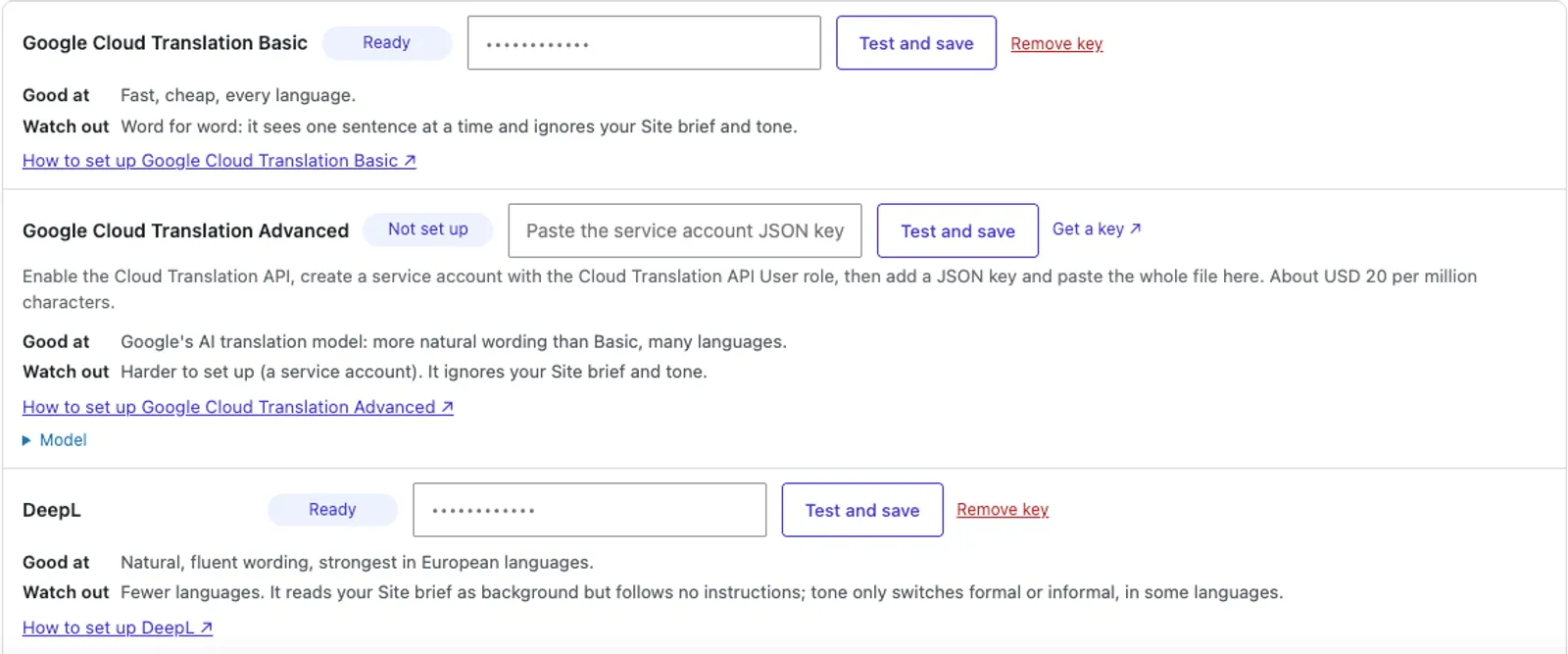
Lango7 Free uses the translator built into Google Chrome. It runs on your computer, so you need no account or API key. You can add as many languages as you like from the 47 Chrome can translate. Lango7 Pro costs $49 a year for 1 site or $199 once, $149 a year for 5 sites and $199 a year for 100 sites, with a 30-day refund. Lango7 sets no word or page limits. You add your own key for Google, DeepL, OpenAI, Claude or Gemini and pay that provider directly.
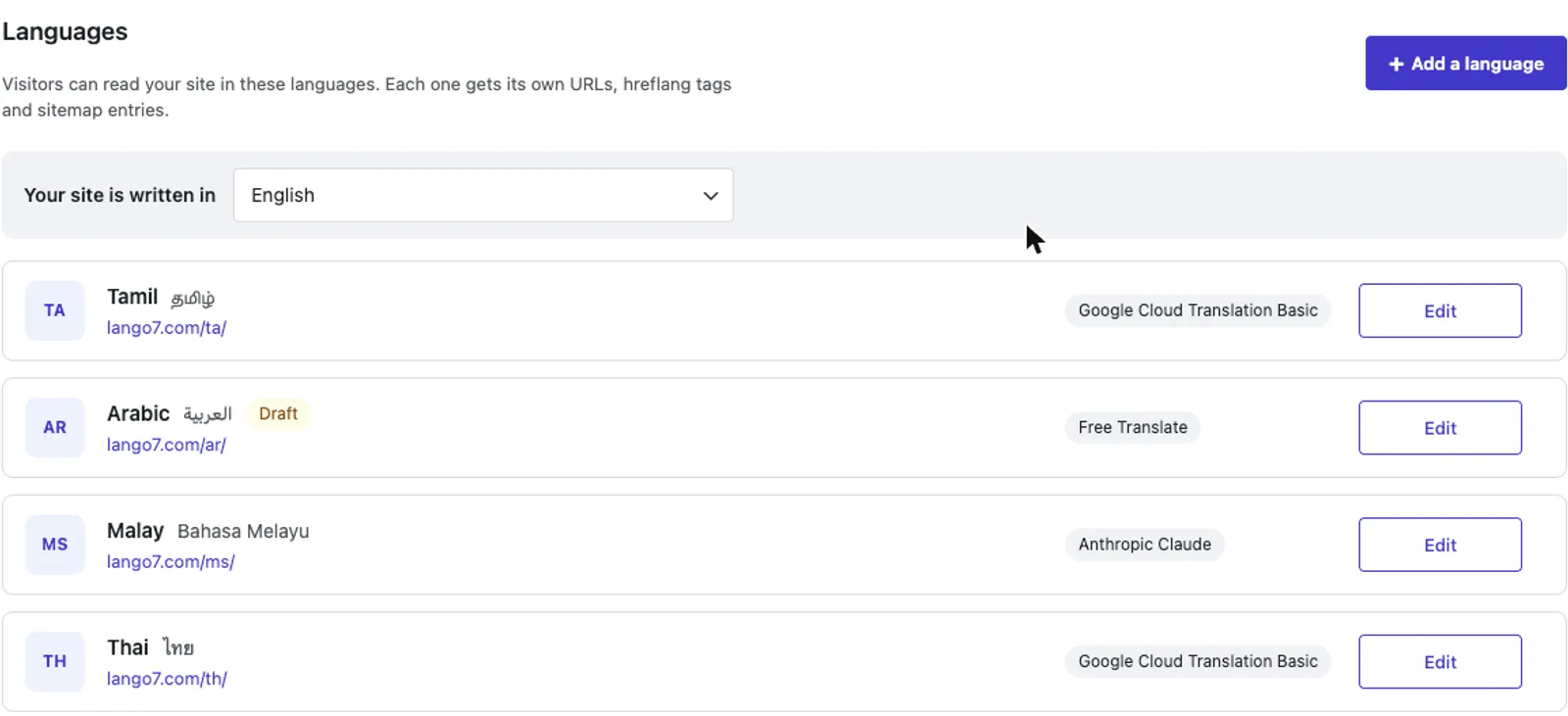
It suits people who want to choose a translation service for each language, see the cost before anything is sent, and avoid a word allowance. The Pro screens for cost estimates, approvals and draft languages are in the docs.
The weak spots are real. Free needs desktop Chrome 138 or later, and you keep the tab open while it runs. Pro makes you set up and pay for your own provider key, which is more work than an all-in-one plan. It is also the newest plugin here, so it has a shorter track record than the other five.
Translated URLs and SEO
If search traffic matters, check which plan translates your page addresses. The plugins differ on this, and none of them guarantees rankings.
- Polylang: translated slugs come with Pro.
- TranslatePress: the paid SEO Pack translates meta information and the URL slug.
- Weglot: translated URLs are listed from the Pro plan.
- GTranslate: URL translation is an optional feature and is part of the Business plan.
- Lango7: Pro can translate slugs and redirects from the old ones. Free keeps your original slugs. See what Lango7 does for search.
Which one should you pick?
- A large or complex site, several editors, or professional translators: WPML.
- A free, hands-on setup where you write each language yourself: Polylang.
- Translating visually on the page and staying in control: TranslatePress.
- A hands-off setup that you can budget by word count: Weglot.
- Mostly automatic translation, with translated URLs as an option: GTranslate.
- Trying one language at no cost, or paying your own AI provider instead of a word allowance: Lango7.
If you only need one language and a handful of pages, any of the free options will do. I would try one on a staging site before paying for any of them, and check the language you need on your chosen service first. For a first test with Lango7, follow Translate your first page with Free.
Best multilingual plugin for WordPress: common questions
What is the best multilingual plugin for WordPress?
No single plugin wins. WPML suits large and complex sites, Polylang suits hand-written translations on a budget, TranslatePress suits visual editing, Weglot suits a hands-off setup, and Lango7 suits people who want to pay an AI provider directly.
Is there a free multilingual plugin for WordPress?
Yes, with limits. Polylang’s free plugin has no language limit but no automatic translation. TranslatePress Free adds one language, and Weglot’s free plan covers 2,000 words and 1 language. Lango7 Free uses Chrome’s translator and needs desktop Chrome.
Which multilingual plugin is best for SEO?
The plugins differ mainly on translated URLs. Polylang Pro, the TranslatePress SEO Pack, Weglot Pro, GTranslate’s URL translation and Lango7 Pro can all translate slugs or URLs. Check which plan you need, because none of them guarantees rankings.
Should I choose WPML or Polylang?
Choose WPML if you want built-in translation management and a plan that covers page builders and e-commerce, from €99 a year. Choose Polylang if you want a free core plugin and will write the translations yourself.
Can I use DeepL with a multilingual plugin?
Yes. Polylang Pro and the paid TranslatePress add-on work with DeepL, and so does Lango7 Pro, with your own API key. See how I got a free DeepL API key and what it covers.
Try Lango7 Free on one page
Any language Chrome can translate, with no account and no API key. Add Pro when you need more.