OpenAI follows your Site brief, notes per language, tone and glossary, so it suits pages where wording matters. OpenAI bills by tokens, and new API accounts pay from credit bought in advance.
A ChatGPT Plus subscription doesn’t include API use. The API is billed on its own.
Obtén la clave
- Go to the OpenAI API platform and sign up or sign in.
- Open the billing overview, click Add payment details and buy credit. The minimum is $5, and purchased credit expires after one year in most countries.
- Check Use auto-reload before you confirm. It’s on by default, so turn it off if you don’t want OpenAI to buy more credit by itself.
- Open API keys and click Create new secret key. Name it, for example “Lango7 example.com”.
- Copy the key straight away. It starts with
sk-and you can’t view it again.
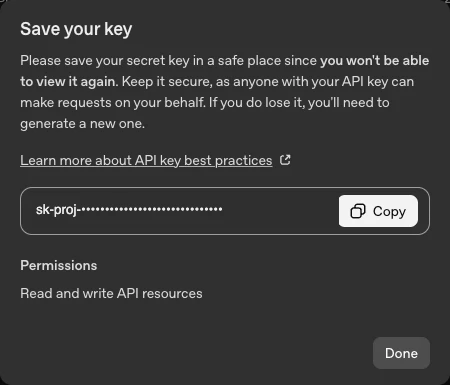
Anyone with the key can spend your credit, so don’t put it in emails, screenshots or support messages. If it leaks, delete it on the API keys page and create a new one.
Añádela a Lango7
- Ve a Traducir → Ajustes → Motor de traducción.
- Paste the key into the OpenAI box.
- Under Model, pick one. GPT-5 nano is the default and costs least; GPT-5 mini balances quality and cost.
- Haz clic en Probar y guardar. Lango7 envía una frase de prueba corta y guarda la clave solo si funciona.
Las claves se guardan cifradas. Si prefieres no guardar la clave en la base de datos, añade define( 'LANGO7_OPENAI_KEY', '…' ); a wp-config.php en su lugar.
Controla el gasto
- In the OpenAI platform, open your project’s Limits, set a monthly spend limit and turn on Enforce a hard limit. Without it, the limit only tracks spending. OpenAI says enforcement isn’t instant.
- En Lango7, define un límite diario de character.','values':{'g1':'character'}
- Turn off auto-reload if you don’t want credit bought automatically.